Product Updates
We're building the future of design tooling. Join us and help make design intuitive for everyone.
 Boris Janković
Grid layouts, mixed text styles, Wonder Capture, and a more capable MCP
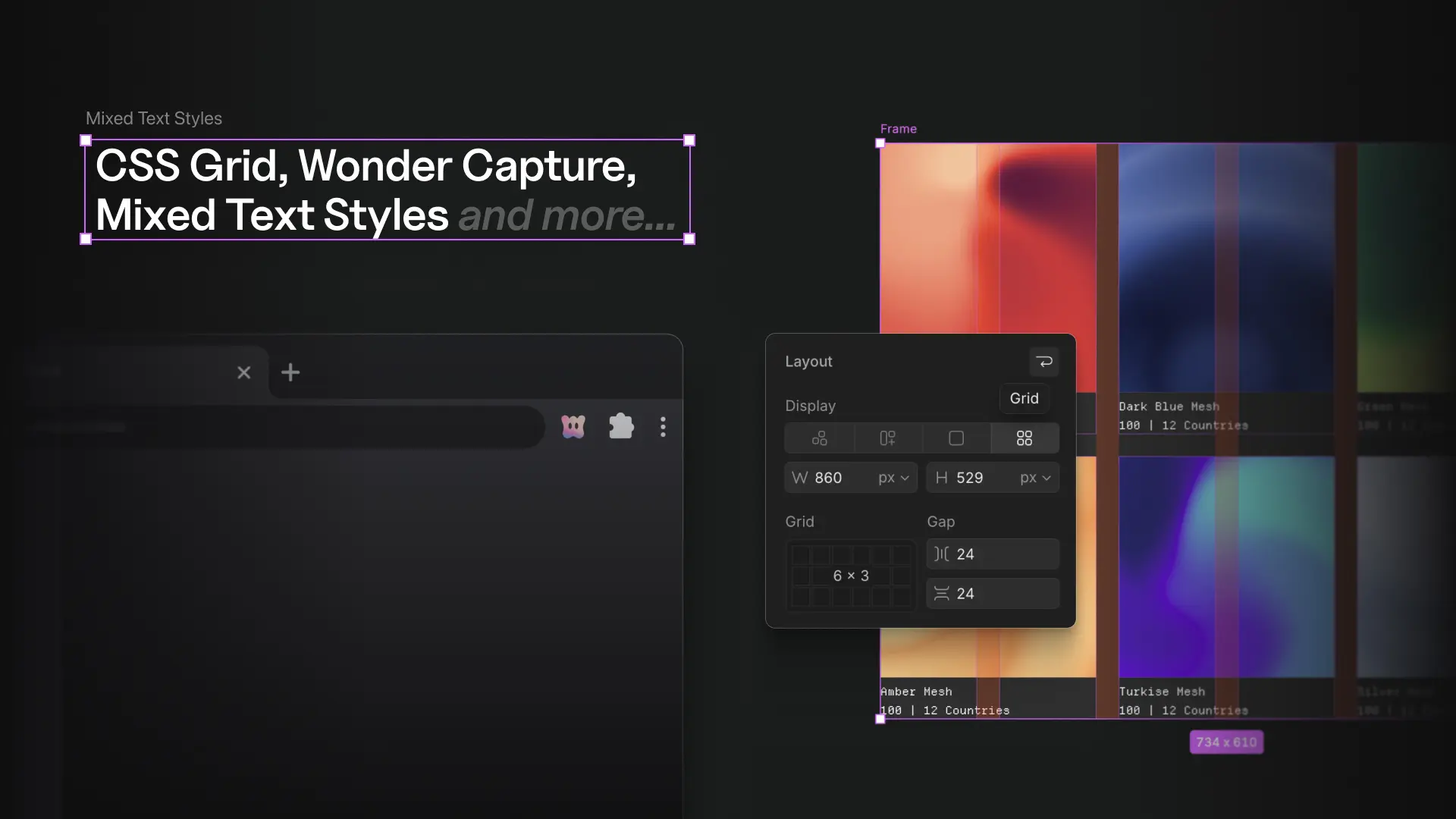
Block, inline, and grid layouts on the canvas, different styles inside one text layer, the Wonder Capture browser extension, a more capable MCP, and a long list of improvements and fixes across the app.
Features
- Block, inline, and grid layouts. The canvas now supports native document flow. Switch any frame between freeform, flex, block, and grid from the Display control. Grid comes with column and row track editors, a visual dimension picker, gap handles, cell-aware drag and drop, and resizing that snaps to spans. Frames can live inside a line of text as inline elements and wrap with it. Pasted captures keep these layouts, and exported code uses them instead of faking them with flex.
- Style a few words differently inside one text layer. Select characters while editing and change their weight, size, color, or spacing right in the properties panel, so a bold stretch or a colored word no longer forces you to split a sentence into separate layers. The panel lists the styles applied to specific words, editing the base style still flows through them, and Group into one text merges text layers you had split apart back into a single layer.
- Wonder Capture. A Chrome extension that grabs any webpage, or just part of it, and pastes it onto the canvas as fully editable layers. Fonts, images, icons, masks, and typography come along, including from Google Slides and local dev servers. Install it from the downloads page and read the guide.
- A more capable MCP. Add Wonder to Claude as a custom connector with the new guide. Agents can upload local images, generate images and SVGs, open a file in a desktop tab, and work on any page of an open file. Tool calls target the file you are looking at, results are leaner, errors say whether a retry will help, and viewers can use the read-only tools.
- Admin role. Make a member an Admin to manage people and settings without owner-only powers like renaming or deleting the workspace.
- 100 free shaders. The free tier grows from 24 to 100 presets, premium presets show as locked in the gallery, and two library updates brought new presets.
- New AI models. Gemini 3.7 Flash and Grok 4.6 join the model picker.
Workspace improvements
- Recent files in a new tab. In the desktop app, the + button opens a recent-files view with a New file action and search.
- Open in desktop from the browser. Files hand off straight into the desktop app, and the button only shows when you are in the browser.
- A steadier desktop app. AI activity shows in tabs, tabs are easier to tell apart, external links open in your system browser, an offline screen and a crashed-tab placeholder replace blank views, and the open file and window size survive an auto-update.
- Small additions. Discord and Slack links on the onboarding welcome screen, and new files are named after famous designers instead of cities.
- More docs. New guides for variables and tokens, icons, vectors, shaders, pasting your existing designs, Wonder Capture, and your codebase.
Editor improvements
- Copy a link to your selection. Share a link that opens the file on exactly the elements you selected, and the share button now copies the current page link.
- Paste into everything selected. Paste fills every selected element, and paste-and-replace swaps each one while keeping its anchor.
- Hold Space to keep elements inside their frame. Move things around without reparenting them.
- More shortcuts. Opt+C and Opt+V center an absolutely positioned element in its parent, Shift+A wraps the selection in a flex frame, and every canvas tool and grouping action is searchable from the command palette.
- Multi-selection. Spacing helper lines, shader fills, and anchor changes now work across a multi-selection.
- Color picker. Bind color variables from inside the picker, the fill row has its opacity input back, and the fill-type switcher hides when there is only one fill.
- Icon library. Add selected icons to your library, organize them by dragging, multi-select, and subcategories, and preview icons on hover in the picker.
- Dark canvas in dark mode. New files default to a dark canvas background when the app is in dark mode.
- Layout controls. The properties panel shows and edits content-sized, percentage, and reverse-wrapped layouts, text gets indent and font smoothing controls, and duplicating again repeats the previous offset.
- Faster canvas. Toggling sidebars, entering frames with many layers, marquee selection, and dropping images are all faster. Selection hides while you adjust shadows, and the layers panel has a horizontal scrollbar.
- Presence. The avatar strip is now a multiplayer dropdown, multiplayer tools no longer crowd each other, and a lone collaborator shows their avatar instead of +1.
AI improvements
- Multi-page generation lands on the canvas. Each generated page is placed next to the others instead of on top of them, whether it comes from chat or from MCP.
- Layouts the AI can use. Designs use grid, block, and inline layouts where they fit, not only flex.
- Better design fundamentals. Palettes derived from a mood, a deliberate typographic register, and fewer clichéd pairings.
- Predictive text knows the conversation. Text completion in chat uses the AI's last reply as context.
- Image generation. Prompts pass through verbatim, and reference images are fetched from your uploads.
Bug fixes
- Fixed selection boxes being offset on generated elements, and the selection box not working when a drag starts over the parent.
- Fixed flex fill items not taking equal space, and changing text properties before typing removing the text box.
- Fixed dragging one gradient endpoint moving the other, and mask overlays not matching gradients.
- Fixed duplicated fixed frames losing their fixed position, and pinned children losing their anchor when reparented or alt-drag duplicated.
- Fixed nested frames breaking drag-back reparenting, clicks under stacked frames selecting the wrong frame, and dragging a child out of an overflowing parent reparenting it.
- Fixed two copies of one SVG sharing definitions, SVG masks lost on capture paste, and an SVG icon replaced via chat becoming unselectable.
- Fixed custom fonts not applying after upload, captured designs losing their typography after reload, and custom fonts missing from screenshots and thumbnails.
- Fixed pasting a large captured design failing, Tailwind v4 pages refusing to paste, layered CSS masks lost through capture, and centered text lost on import.
- Fixed shader and SVG images missing from exported code and image exports, the ASCII shader rendering blank in screenshots, and rotated text clipped in local export.
- Fixed chat images applied at oversized sizes, uploaded images dropped when one was slow, and Lucide icon requests silently failing.
- Fixed generated desktop pages rendering squished, and a prompt refused for content policy telling you to contact support.
- Fixed editing an older chat message closing when changing the model, queued messages appearing before the current reply, and truncated answer options.
- Fixed collaborator cursors drifting from their real positions, some users never connecting to realtime collaboration, files that loaded empty or failed to load, and very large files failing to open.
- Desktop: fixed keyboard shortcuts after refocusing, a second login opening the welcome file, expired sign-in links dead-ending, registration not returning to the app, GitHub sign-in doing nothing in settings, missing file thumbnails, the home tab not syncing, and the update prompt reappearing after a restart.
- Fixed toasts rendering behind modals, focus states on properties inputs, the zoom menu and screen picker layouts, the repo list scrollbar overlapping Connect, and text not being copyable from the MCP modal on desktop.
- Fixed new files missing from search, the last created file hidden on the desktop home tab, and the loading animation appearing late when opening a file.
- Fixed sign-in errors rendering nothing, a changed provider email locking you out, and a disconnected sign-in method still signing in.
- Fixed MCP authentication expiring after a computer lock, and tool calls targeting the wrong file with several tabs open.
- Fixed unsupported browsers being blocked before reaching the canvas, and the password field rendering badly in Firefox.
- Boris Janković
Canvas gradients, presence controls, and documentation
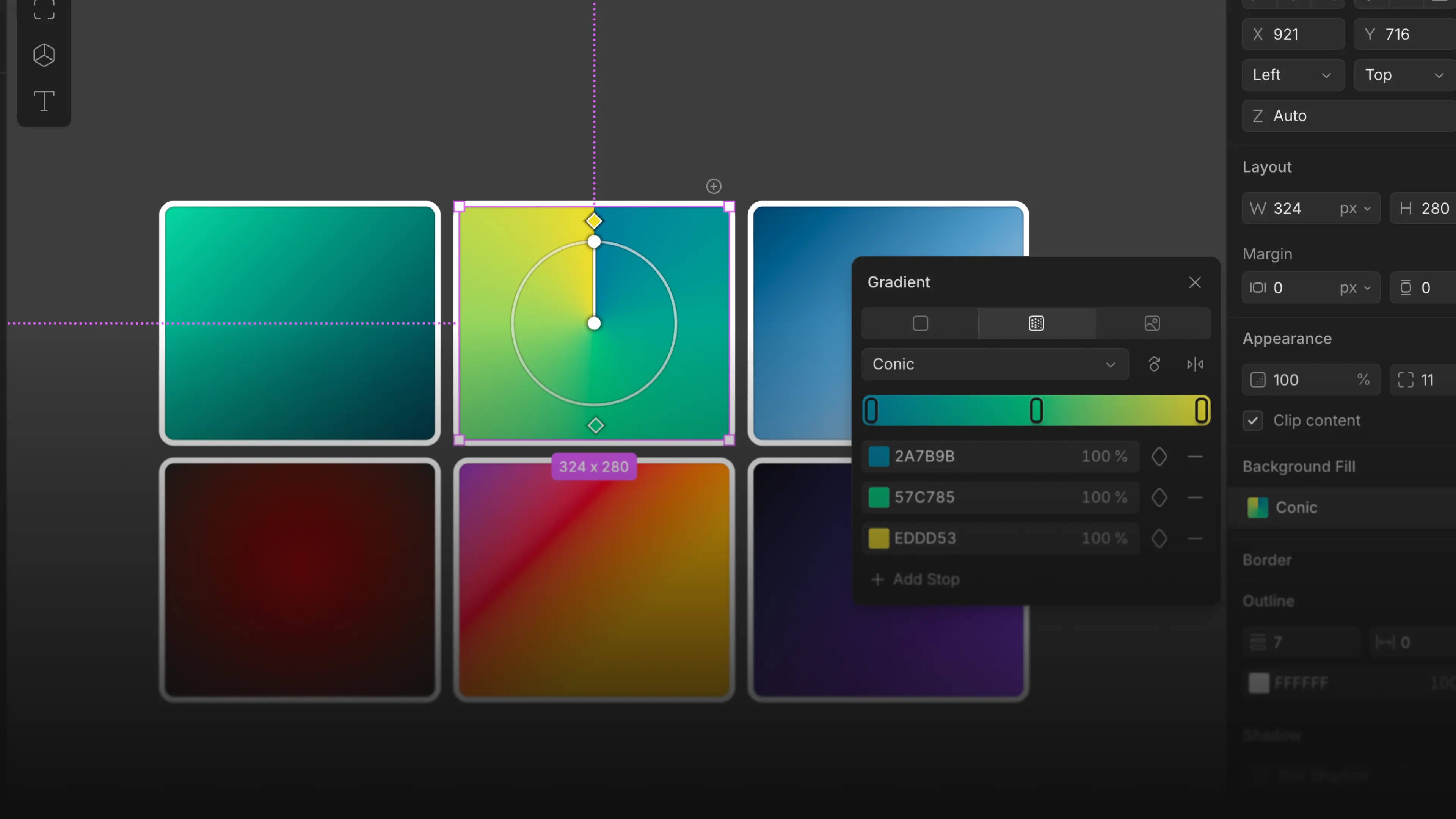
Gradients you edit on the canvas, presence controls for collaboration, documentation, and dozens of small improvements and fixes throughout the app.
Features
- Edit gradients directly on the canvas. Drag the axis to stretch and rotate, drag color stops along it, and click to add a stop with the interpolated color. Every stop takes its own color, alpha, and variable binding, and everything exports as plain CSS.
- Collaboration presence controls. Hide other people's cursors, appear busy so nobody can follow you, or go invisible and drop off presence entirely.
- Wonder asks before it guesses. When a request is ambiguous, the AI now asks clarifying questions right in the chat, with one-click answers or your own. Answer and the same run continues with your real intent.
- Reorder pages by dragging. Drag any page in the Pages panel to reorder it.
- New AI models. Claude Opus 5, Gemini 3.6 Flash, and Gemini 3.5 Flash Lite join the chat model picker.
- Docs and a blog. A new documentation site with full Wonder MCP and GitHub guides, plus a blog.
Workspace improvements
- Customize your pins. A dedicated modal for choosing pinned files on Overview, and pins now work inside folders.
- More from the desktop app. A right-click menu on tabs, mouse and keyboard back navigation, and reopening a file focuses its existing tab.
- Small additions. Create a file straight from Overview, share your profile with one button, and non-owners see Settings Overview read-only instead of blank.
Editor improvements
- Arrow keys everywhere. Navigate the layers list with arrow keys, and reorder elements inside an auto layout with them too.
- Alignment guides that reach the parent. Guides from child elements now attach to the parent, with dotted lines to their anchors.
- Fit a section to its content. Double-click a divider to fit a section to its content.
- Spell check in the context menu. Right-click a misspelled word to correct it.
- Faster variable cleanup. The delete shortcut works in the Variables panel, and variable groups can be deleted.
- A safety net for generation. A warning before closing a file mid-generation.
- Polish across the panels. Background Fill, Variables, header controls, sidebar icons, and folder indentation all got a pass.
AI improvements
- Live progress in chat. A running timer and status label while the AI works.
- Longer runs that survive. Generation can run up to 30 minutes, and a run that times out can be continued instead of lost.
- Steadier connections. Chat recovers from dropped connections, in-flight runs survive reconnects, and the canvas reconnects on its own.
- Chat no longer hangs. A stalled request surfaces a real error instead of retrying forever, and oversized images are shrunk to fit.
- Better model failover. Transient provider errors retry, and a failing model is routed around instead of failing your request.
- Undo alongside AI. Undo behaves correctly while the AI is editing the canvas.
- Cleaner output. The AI keeps the current thread's context, internal update text no longer leaks into chat, and corrections no longer create duplicate text and cards.
Bug fixes
- Fixed color styles translating to the wrong hex values.
- Fixed the transparency checkerboard using light-only colors in dark mode.
- Fixed the color picker not switching when you select a different gradient stop.
- Fixed descenders being clipped on lowercase letters, and truncated text not showing an ellipsis in flex layers.
- Fixed shaders rendering above frame content, clearing the selection when dragged inside a frame, and not resizing with the desktop window.
- Fixed pasting a fill or auto-sized layer blowing up its size.
- Fixed dragging a layer into an auto layout parent making it absolutely positioned.
- Fixed width and height options behaving unpredictably, and alignment drifting from its stored values.
- Fixed Shift+A changing element order.
- Fixed the add-to-chat button blocking canvas panning and being overwritten by the command palette.
- Fixed Figma paste misrendering text and dividers, and improved import accuracy for complex components.
- Fixed exported code substituting display fonts to Inter.
- Fixed the file background not changing, and "Back to files" not returning to the parent folder.
- Fixed stale selection overlays after the AI deletes elements inside a frame.
- Fixed collaboration sync divergence after a slow file load, and a crash loop on certain documents.
- Desktop: fixed battery drain when the window is covered, missing app icons, a login loop, the sign-in confirm click, stale update checks, and the reload message reappearing on Home.
- Fixed scroll areas losing their bottom padding, and extra space in an empty background fill section.
- The shared file link animation now shows once per machine, the Figma import notification and sidebar collapse animation were removed, and the Discord invite link was updated.
- Boris Janković
Work with your GitHub Repository on the canvas and Desktop App

Connect a GitHub repo so the AI can read your code and rebuild real product UI on the canvas, and take Wonder to the desktop on Mac and Windows.
Features
- Connect a GitHub repository. Link a repo to a file and the AI can read your code on any branch and rebuild real product UI on the canvas. Imported elements link back to their source files, out-of-sync elements get one-click AI resync, and finished designs can be exported as a pull request. Learn how it works in the GitHub docs.
- The desktop app, for Mac and Windows. Native tabs you can drag to reorder like Chrome, standard shortcuts, its own secure login, and auto-updates. Get started with the Wonder Desktop App by downloading here
- Boris Janković
Design Variables, Icon Library, scale tool and customizable panels
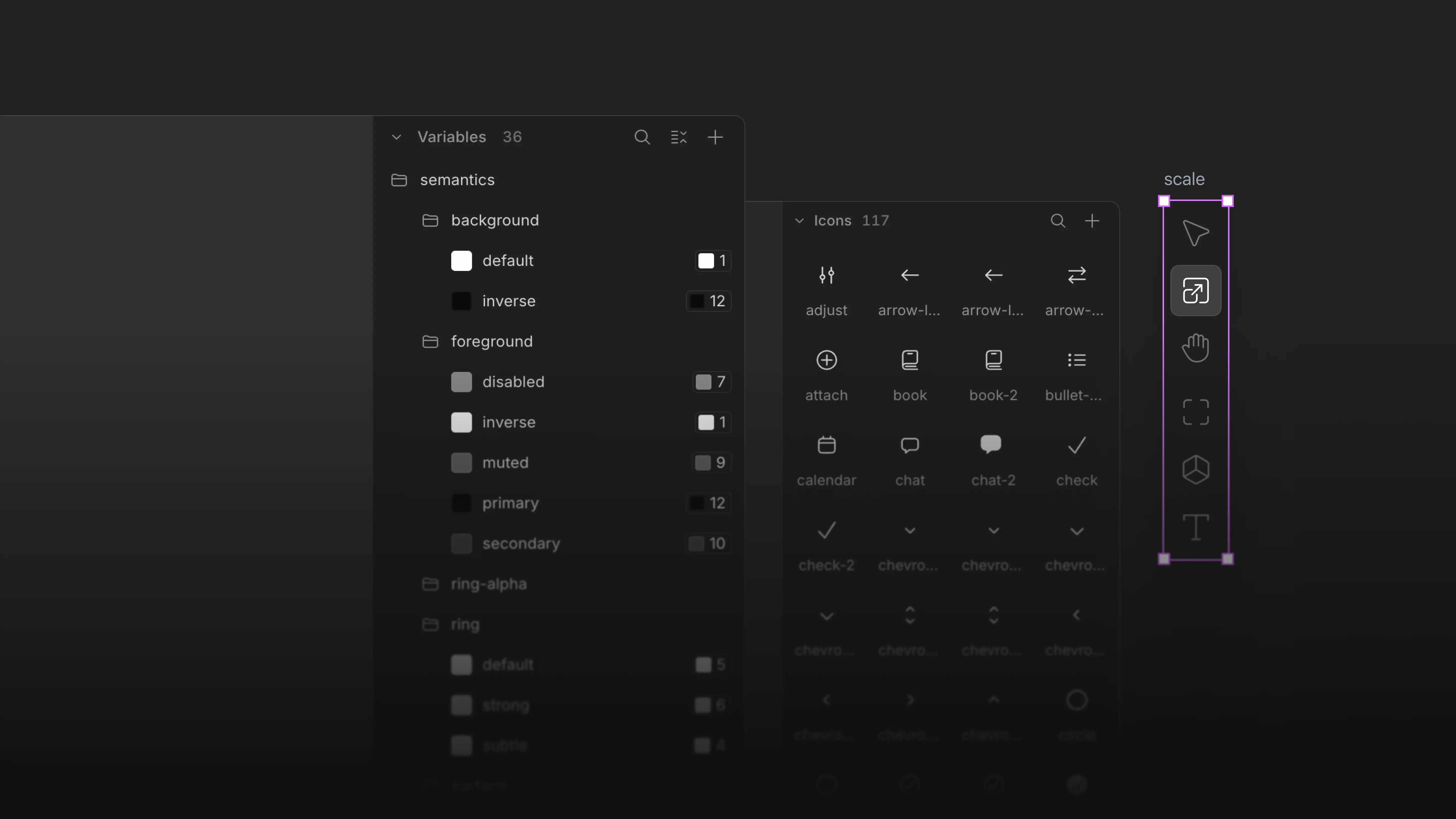
Design tokens land in a Variables panel, every file gets an icon library, and the canvas gains real z-index, a scale tool, customizable panels, and smarter selection — plus a deep round of editor and AI improvements.
Features
- Variables. Design tokens have arrived: create and manage them in the new Variables panel, bind them to property fields, and detach anytime. Import from CSS variables or pasted Figma tokens, and export as Tailwind, CSS, or DTCG. The AI can create, apply, and reuse them too.
- Icon library. Every file now has its own icon library. Upload, paste, or add icons from a selection, swap any icon from the properties panel, and copy-as-code produces self-contained icon components.
- Real z-index. Stacking contexts render like the browser, and z-index is editable from the properties panel.
- Scale tool. Scale any selection proportionally on canvas, with dedicated cursors, percentage values, and alignment lines.
- Two selection behaviors. Wonder now defaults to Deep selection, which smartly picks the deepest logical layer in one click. Prefer the classic Figma-style way — parent first, with double-click to drill down? Switch in View > Selection behavior > Classic.
- Customizable panels and saved views. Add more sidebar panels from the View menu and drag to reorder them however you like. Save arrangements as named views, set a personal default, share a view with your organization, or use the new Focus preset.
- Advanced
⌘Ksearch. The command palette now searches pages, layers, and files from one place. - Interactive onboarding. New users get a hands-on tour of the app: generate a design, work on existing designs with AI, add a shader, and export designs as code.
- New AI models. GPT 5.6 and Kimi K3 join the chat model picker.
Editor improvements
- A clearer left panel. Nested frames are easier to scan and select, and layer and variable search was redesigned.
- Resize to fill. One click to make a node fill its parent.
- Smoother zoom. Mouse-wheel zooming is smoothed on web and desktop.
- Crisp canvas labels. Frame labels render sharper, with better contrast at every zoom level.
- Small niceties. Press feedback on buttons, double-click to hug content, refined text-editing selection, tooltips across the editor, new command palette icons, an eye icon on the page color picker, and polish across core controls.
AI improvements
- Designs land on the canvas. The AI never answers a design request with a code dump in chat. It builds the design on your canvas.
- Smoother streaming. Replies reveal at a steady, even pace, and chat now works across multiple tabs.
- Longer conversations. Long threads are summarized instead of hitting a wall, and the AI can search the full history of a thread.
- Context at a glance. The chat box shows a live meter of context and credits usage.
- Chat context menus. Right-click any chat in the history for its own actions.
Bug fixes
- Exporting multiple layers now downloads a zip file with all of them included.
- Fixed the canvas background resetting after reopening a file.
- Fixed new files occasionally opening without a page.
- Fixed selection boxes drifting on generated designs.
- Fixed alignment helpers shifting after duplicating rotated nodes, and padding handles moving inversely on flipped nodes.
- Position can now be toggled between absolute and relative for multiple nodes at once.
- Fixed legacy hsla() colors and near-black colors rendering incorrectly.
- Fixed older chat messages jumping to the bottom, and chat content overflowing sideways.
- Fixed the "Add to chat" chip lingering after a collaborator deleted the selection.
- Boris Janković
Full Collaboration, personal workspaces, folders and a simpler billing
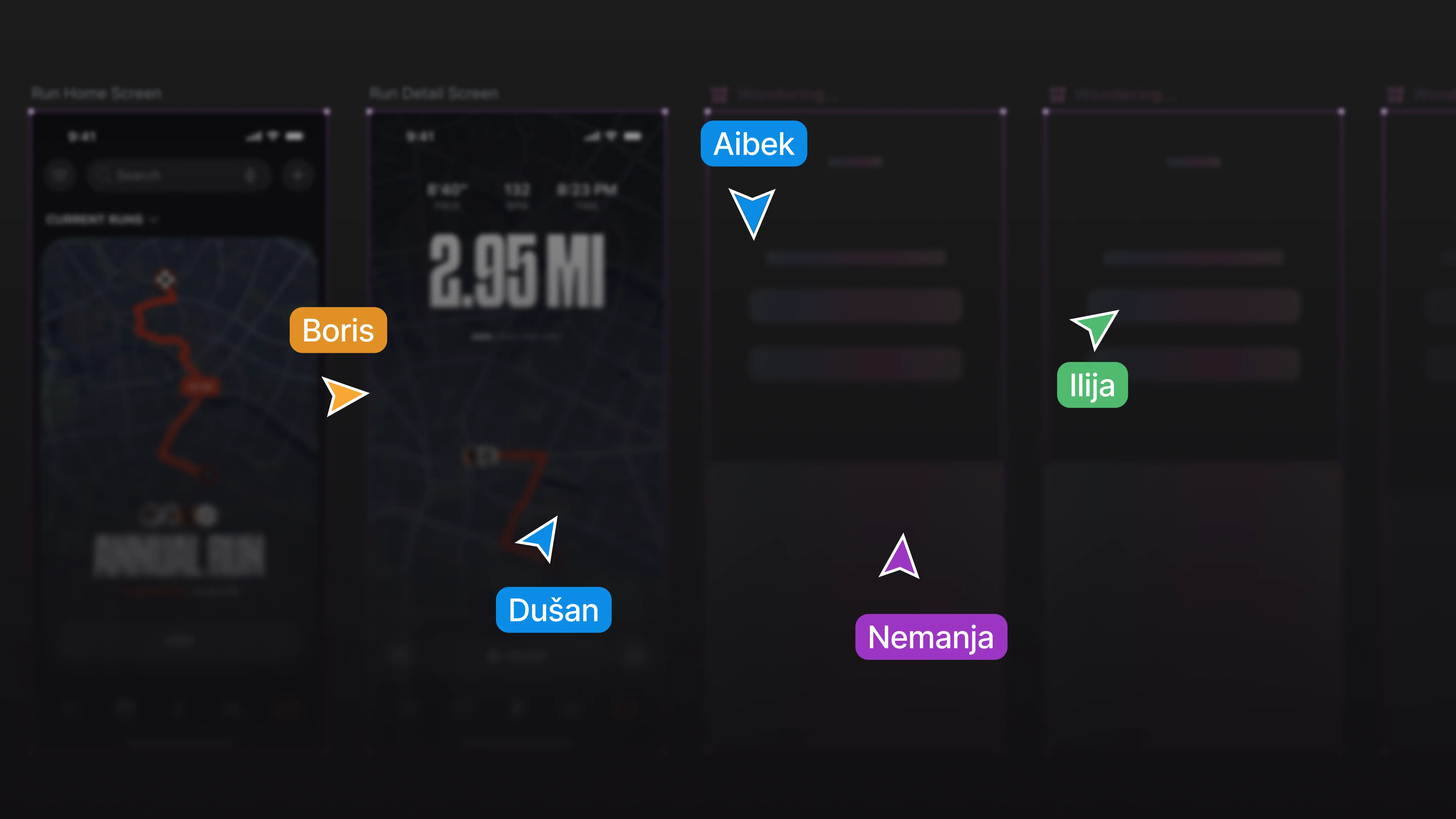
Design together in real time, share files publicly or privately, invite your team as editors or viewers with roles and permissions, and pay a simple flat price per seat.
Features
- Full collaboration. Design together in real time: everyone in a file sees edits, selections, and presence live, and connections recover cleanly on their own. Invited viewers follow along in read-only, and public files can be viewed by anyone.
- Invite your team. Bring people into your workspace as Editors or Viewers, with roles and permissions enforced everywhere. Viewers are always free and follow along in read-only.
- A new files home, and public or private files. The Overview and Files pages were redesigned, and every file is now public or private, the way GitHub does repositories: public files appear on your profile and can be viewed by anyone; private files stay with people who have access.
- Folders. Organize the files dashboard with nested folders: drag files in, merge two files into a new folder, and multi-select files for batch actions. Folders work from the context menu, the command palette, and the AI.
- Personal workspaces and profiles. Every account gets a personal organization with a profile page: avatar, your files, and an About section with Markdown editing you can update from the canvas, the command palette, or the AI.
- Simpler billing. One flat price per editor seat, AI credits included, and pay-as-you-go usage with spend caps when you need more. Pro comes monthly or yearly, with savings on yearly.
Workspace improvements
- Custom workspace URL. Owners can change their workspace slug.
- Profile polish. Social links on your profile, clickable member avatars, and a smoother invite page for every account state.
- A rebuilt usage page. Aggregated summaries plus a per-request table that matches what you are billed.
Bug fixes
- Fixed read-only banner colors in dark mode, modal stacking, and the app forgetting your selected organization on refresh.
- Boris Janković
Custom fonts, a talkable canvas, and predictive text
Custom fonts, a canvas you can talk to, predictive text, and a deep pass of polish and stability across the editor.
Features
- Custom fonts. Upload your own fonts, hosted by Wonder and shared automatically across export.
- Talk to the app. The
⌘Kcommand palette is now connected to the AI, so you can ask Wonder to run actions and navigate the app for you. The palette also gained a batch of new actions. - Predictive text. Wonder can finish the copy you're typing with inline suggestions.
- Changelog on the canvas. Read what's new directly in the app from the help menu, which also got a full overhaul.
- A sound when generation finishes. An optional chime when a chat reply completes.
Editor improvements
- Drag to reorder fills, borders, and shadows. Reorder any of these lists by dragging.
- Select any layer under the cursor. A right-click "Select layer" submenu lets you pick any nested layer beneath the pointer.
- Select on canvas for uploads. Pick an existing node directly as the asset in SVG, image, and shader upload modals.
- Better undo / redo. Compound actions group together, selection is restored after delete, and typing in text fields no longer shatters undo into per-keystroke steps.
- New pages inherit their color. A new page now takes the background color of the page it came from.
- Image context tokens. Inline image chips in chat with a full-resolution viewer.
- Persistent layout. Sidebar and layout configuration now follows your account across sessions.
AI improvements
- Designs are protected. The AI now duplicates before editing, so it never overwrites an existing design unless you explicitly ask.
- Better SVG generation. Quiver vector generation is more reliable, with cleaner streaming, stream-timeout handling, and improved hand-drawn output.
- Smarter context. The AI now knows your organization, file, and page names.
- Fixed remove-background. The remove-background quick action no longer deletes the whole image.
Bug fixes
- Fixed a flicker when editing a chat message and a spurious empty row appearing in the composer.
- Fixed the "new version" reload toast firing on every tab refocus and interrupting edits.
- Fixed padding and margin canvas overlays staying visible permanently.
- Fixed the command palette scroll regression and repositioned the
⌘Kmodal. - Fixed the organization logo getting stuck while loading.
- Fixed several canvas and renderer crashes affecting startup and editing stability.
- Boris Janković
Chat history, command palette, and a faster canvas
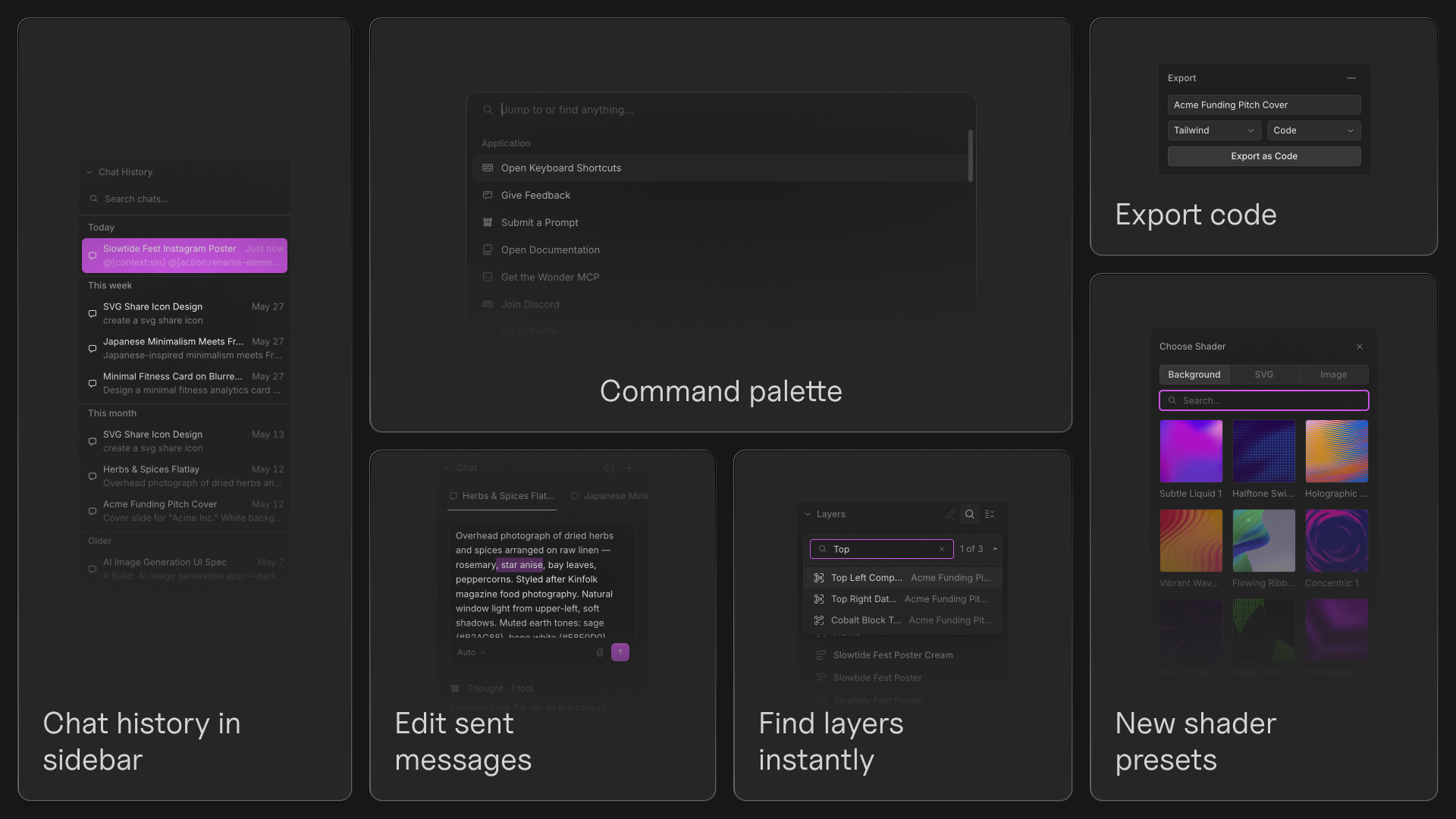
This update brings a faster navigation experience, a more powerful chat workflow, improved editing controls, and a large collection of polish across the canvas.
Features
- Chat history. Every conversation now lives in a dedicated sidebar, making it easy to revisit previous chats and continue where you left off.
- Command palette. Press
⌘Kto search actions, navigate the app, and access tools from anywhere. - Find layers instantly. Search layers by name from the sidebar or canvas and jump directly to matching elements.
- Edit sent messages. Update a prompt after sending it and continue the conversation from that point.
- Export to code. Export sections directly as Tailwind or CSS.
- Edit SVG Colors. SVG colors are now editable, including icons that use
currentColor. - New shader presets. Dedicated Background, Logo, and Image tabs now support image and SVG uploads.
Editor improvements
- Math in value inputs. Numeric fields now support calculations and mixed-unit expressions using CSS-style math.
- Better resizing controls. Hold
⌥to resize from the center and⇧to maintain proportions. - New editing shortcuts. Added inline text formatting shortcuts and faster Auto Layout creation with
Shift+A. - Copy as PNG. Copy selections directly as PNGs from the canvas.
- Custom file thumbnails. Set any element as the thumbnail for your file.
- Improved layer management. Layer ordering now more closely matches Figma and searching layers is significantly faster.
- Named color support. Color inputs now accept values like
white,black, andred. - Better canvas visuals. Page background opacity now uses a checkerboard preview and several controls have been refined throughout the editor.
Design improvements
- A more consistent canvas experience. Menus, dropdowns, sliders, icons, hover states, and editing interactions have been polished across the app.
- Redesigned file cards. File management is cleaner and easier to scan.
- Unified inline editing. Pages, layers, and files now share the same renaming experience.
- Faster onboarding. Improved loading performance, mobile onboarding, and error states throughout the app.
Bug fixes
- Fixed chat threads occasionally getting stuck while loading.
- Fixed sidebars becoming stuck in a collapsed state.
- Fixed nodes disappearing while zooming and selection bounds becoming incorrect.
- Fixed SVG upload and logo rendering issues.
- Fixed shaders occasionally stopping after opening settings.
- Fixed dragging, scrubbing, and selection issues throughout the editor.
- Fixed several crashes and stability issues across the canvas and properties panel.
- Boris Janković
Dark mode and a rewritten chat experience
A full dark theme lands across the canvas, chat gets Cursor-grade message queuing and a draggable tab strip, and a long list of editor and AI improvements ship alongside.
Features
- Full dark theme across the canvas app. Dark mode now covers the canvas UI and visual styling across the app. Page backgrounds respect the theme and remember their persisted color.
- Quiver AI SVG generation. Ask Wonder to generate a vector, and it streams a Quiver SVG straight onto the canvas. Background tabs and partial chunks no longer break the stream, and SVG nodes export cleanly back out.
- Message queuing in chat. Cursor-grade queuing. Type the next prompt while the model is still answering, hit send, and we queue it up. No compromises around streaming order or context.
- Chat tab strip with drag-to-reorder. Multiple chats in a file, draggable to reorder, plus a history dropdown, an X to close on the icon, and a banner for currently selected nodes.
- Find every shipped shortcut. Page switching with PgUp / PgDown / fn + arrows, hide or show frame title from right-click, scramble-text animation when the AI renames a layer, double-click the file name in the editor header to rename, and Option-scrubbing on linked layout values.
Editor improvements
- New editor top chrome. Sidebar collapse icons, file name front and center, a restructured main menu with submenus. The whole top of the canvas got reorganized.
- Sidebars are resizable again. Drag the divider to set sidebar widths back where you want them.
- Floating minimized chrome. When you collapse a sidebar, the minimal controls now float instead of taking layout space.
- Multi-selection on width and height inputs. Set the size of every selected element at once without changing layout type.
- Better shadow controls. The shadow section of the properties sidebar is rebuilt with cleaner controls.
- Frame title visibility from the layer list. Toggle whether the title shows above the frame from the layers panel.
- Default text on hug-hug. Adding text inside an Auto Layout that hugs in both directions now picks a sensible default instead of getting trapped in a zero-width frame.
AI improvements
- Rethought chat formatting. Cleaner code blocks, clearer streaming, less visual noise. The implement-design prompt was trimmed to just the copy implementation step.
- Split chat model selector into Agent / Image / Vector. Three discrete buckets so the right model is one tap away.
- Visible selected-context border animates only while the cursor moves. Subtle change, but it means the canvas is calmer during idle generation.
- Right-click fix action. Send selected nodes to your preferred tools for repair.
Bug fixes
- Visible properties no longer flicker on the visibility toggle.
- Gradient color stops now open the color picker on click.
- Truncate now works on text nodes.
- Toast variants now use the larger white Wonder logo and refreshed styles.
- Loading screen gets a small hop animation.
- Multiple text selections no longer show colors as background fills.
- Right-click context menu no longer shows canvas-only items on non-canvas pages.
- Stale chat context, ongoing-generation state, and the toast message when out of free tokens are all fixed.
- Boris Janković
A new sidebar system, more shortcuts, and steadier AI generation
A more consistent layout system across the app, a big batch of new shortcuts, auto-generated file thumbnails, and steadier concurrent AI generation.
Features
- A new sidebar and panel system. A more consistent, flexible layout across the app.
- Better AI generation animations. Clearer visuals while AI edits your canvas.
- A library of new shortcuts.
F2or⌘Rto rename the selected layer from canvas,⌘⇧Ato select similar layers,⌥/,⇧/,⇧Xfor quick fill and stroke,⌃⌥H/⌃⌥V/⌃⌥Tfor distribute and tidy-up, and the reserved single-key tool slots (R,E,P) are now active. - Auto-generated file thumbnails. Leaving the canvas snapshots a thumbnail of your work, so the files list now shows the file you actually built.
- World city file names. New files are named after world cities instead of the old random word combinations.
- Rename layer in the frame context menu. Right-click any frame to rename without going through the layers panel.
- Chat continue. Pick up where a previous reply left off, with the active thread title carried through the command.
Editor improvements
- Auto margin. Set
margin: autofrom the spacing controls, no manual values required. - Spacing input order fix. Top / Right / Bottom / Left, as expected.
- Padding and position when toggling flex. Switching layout type now preserves padding and absolute positioning instead of resetting them.
- Show frame size below the frame while resizing. Live measurements that follow the bottom of the frame as you drag.
- Hide selection bounds while adjusting fill or stroke. The selection box gets out of the way when you are tweaking colors.
- Replace background fills suggestion is suppressed. When the selection already matches the target color we hide the "replace fills" action.
- Hug option no longer shown on frames with absolute children. It would not have worked, so we hide it.
- More stable concurrent generations. Running multiple AI generations at once is smoother.
AI improvements
- Connect flow redesign. A clearer setup experience.
- Stopping generation actually stops everything. Deleting a chat, stopping a reply, or restarting a stopped reply now correctly halts the underlying tools and preserves history.
- Better font fallback. AI-generated designs more consistently use supported fonts.
- Rename elements quick action. One click to rename all selected layers in semantic, descriptive names.
Bug fixes
- Wrong font applied when picked from the search dropdown.
- Upgrade modal rendering empty for new users on canvas after exhausting limits.
- Pasted Figma layers now stay collapsed in the sidebar.
- Middle-click on chat URLs now opens them in a new tab.
- Sign-up and sign-in switching preserves the email and password you typed.
- Fill width now reads
100% Fillcorrectly instead of100 Fill. - New chat focuses the input on open.
- Preview now updates on keyboard-arrow navigation between elements.
- AI-generated artboards no longer resize to 2^18 width or height when payloads include percentage dimensions.
- Pasting a copied flex layout node no longer sets a 2^18 size.
- Boris Janković
Launch Week: Wonder is live
We launched Wonder on Tuesday, April 14, 2026. Here is what shipped that week and the days right after.
Features
- Wonder is live. Public alpha launched on April 14.
- A new shader engine with editable parameters joined the canvas, plus dedicated icons for
space-evenly,space-between, andspace-around. - Page backgrounds persist. Set a canvas background and it stays.
- Custom text caret. Editing text on canvas now uses a Wonder-styled cursor.
- Copy and paste styles from the context menu. Pick a node, copy its visual styles, paste onto another.
- Tooltips on every tool. Every toolbar item now has a tooltip explaining what it does and its shortcut.
- New AI model: Kimi. Available from the model picker in chat.
Editor improvements
- Gap and padding handlers on canvas. Pull on the gap or padding directly without leaving the canvas.
- Improved multi-selection logic. Cleaner selection through nested Auto Layout, smarter merging across hierarchies.
- Better alignment lines for text nodes. Text aligns to the visual edge rather than the bounding box.
- Layer panel polish. Tabbing through layers feels smoother, visibility order is fixed, and undo/redo of layer changes saves correctly.
- Border radius input. Typing
9999no longer silently changes to1000. - Modifier helper lines update during arrow-key nudging. The second modifier line tracks live now.
- Flex shrink logic for fixed-size children. Fixed children inside flex containers now behave correctly under shrink.
- Figma copy and paste improvements. Pasting from Figma now preserves more structure and styling fidelity than before.
- MCP connect modal refinements. Layout and tool selection flow got a polish pass.
Bug fixes
- Default thumbnail icon updated.
- Outline visibility for editable host elements no longer flickers.
- Dragging a node with margin no longer drifts off the cursor.
- Duplicate children inside a flex parent no longer regress on paste.
- Selection boxes are no longer offset on AI-generated UI elements.
- Pasting copied Auto Layout no longer sets a maxed-out size.
- Custom text cursor restores its shape at the padding handle boundary.