

What comes across
Conductor’s dates
Conductor’s announcement says it’s joining Meta, and gives these dates. We checked them on November 6, 2026. Its page is the one to trust.- November 13: Conductor Cloud goes read-only. Conductor says you can still read old chats and export data.
- November 20: Conductor Cloud shuts down, and Conductor begins deleting Cloud user data.
- Early 2027: Local Conductor starts winding down. Conductor says it works as normal until then.
Before you start
- Finish any chat running in your workspaces. Continuing a chat in two apps splits its history.
- This guide needs a repository with a remote, such as GitHub.
- If your employer provides your Conductor or your repository, check their rules before you copy anything.
Let your agent move it
The agent moves all your recent workspaces once you approve one plan. A workspace is recent if it has uncommitted files or commits not on the remote, or if its last commit or newest chat is under 30 days old. The plan names what stays behind. To move an older one, ask the agent or copy it by hand.- Update Wonder to version 0.2.220 or later.
- In the sidebar, click Create quick chat, or the + next to Quick chats if you already have some. Set the chat to Auto so it asks only for the plan and the card; in Ask, you’ll approve its commands as it goes. Send “Move my work from Conductor to Wonder.”
- Read the plan and reply OK. To move more or fewer workspaces, tell the agent. Then click Allow on the Add these to Wonder? card, which lists each repository and branch. Wonder opens each branch as a worktree on your workspace’s commit, and your chat stays where it is.
Continue a Claude Code chat
Click the new worktree in the sidebar, then Start chat. In that chat, type/resume on its own and pick the chat; anything typed after it is lost. It’s marked continues in this worktree, and opens in a new chat there with its messages. It’s one chat at a time, and Claude Code only.
- Keep the workspace until you’ve continued its chats. Don’t delete it or switch its branch, or Wonder stops listing its chats.
- A continued chat leaves the list. The original stays as it was.
- Long chats: you see the newest 600 messages, and the agent keeps the whole conversation. A transcript over 64 MB shows a note instead of its messages.
- Model: a continued chat keeps the model it last ran on. You can change it in the model picker.
- Messages you didn’t type: Conductor’s own instructions and action prompts may look as if you typed them. The agent still works in the worktree.
If a chat is missing
/resume lists chats from workspaces this guide moved. It shows No terminal conversation found… if your repository’s origin is a folder on your computer, not a URL such as GitHub’s. It can’t match a workspace kept in a custom folder. When the branch has another name in Wonder, it also can’t match a rebased worktree, a workspace with commits since the copy, a remote other than origin, or a missing origin/HEAD.
Go back to the chat that moved your work, and the agent gives you the chat’s ID. Run this in the new worktree’s terminal, choose Yes if Claude Code asks whether to trust the folder, and tell the agent to work in this folder:
Set up your scripts
The agent copies your scripts to the repository’s main folder, where Wonder reads them. Add scripts from~/.conductor/settings.toml by hand in Repository settings.
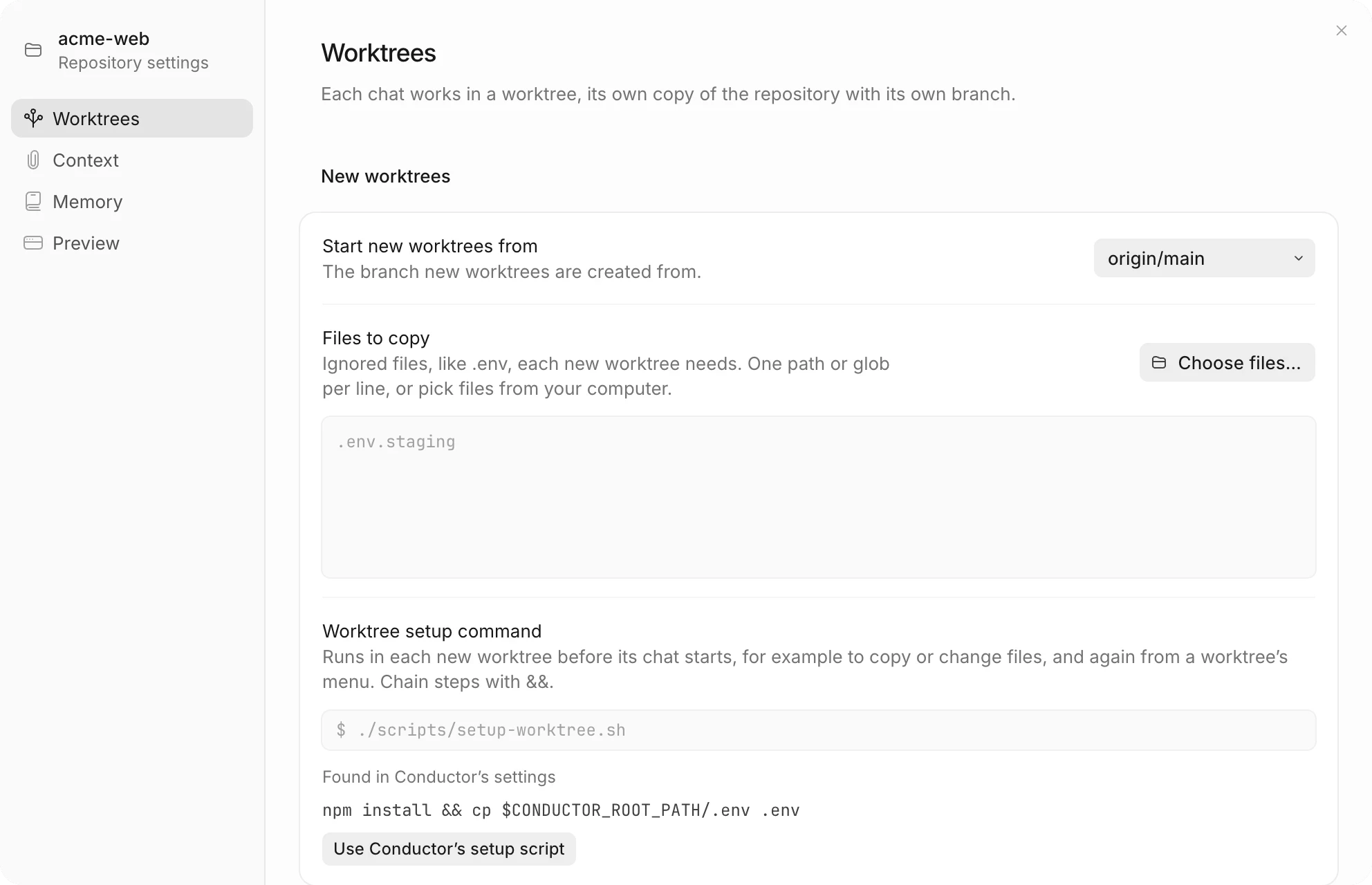
In the repository’s ⋯ menu, open Repository settings.
-
Under Worktrees, click Use Conductor’s setup script and Use Conductor’s archive script. Wonder doesn’t run them until you accept, and the agent says the setup script is waiting.
-
Under Files to copy, list the gitignored files new worktrees need. Write
**/.env.localfor a file at any depth, andcerts/**for a folder. An entry that matches nothing stops every new worktree in that repository, so don’t add a blanket.env*. -
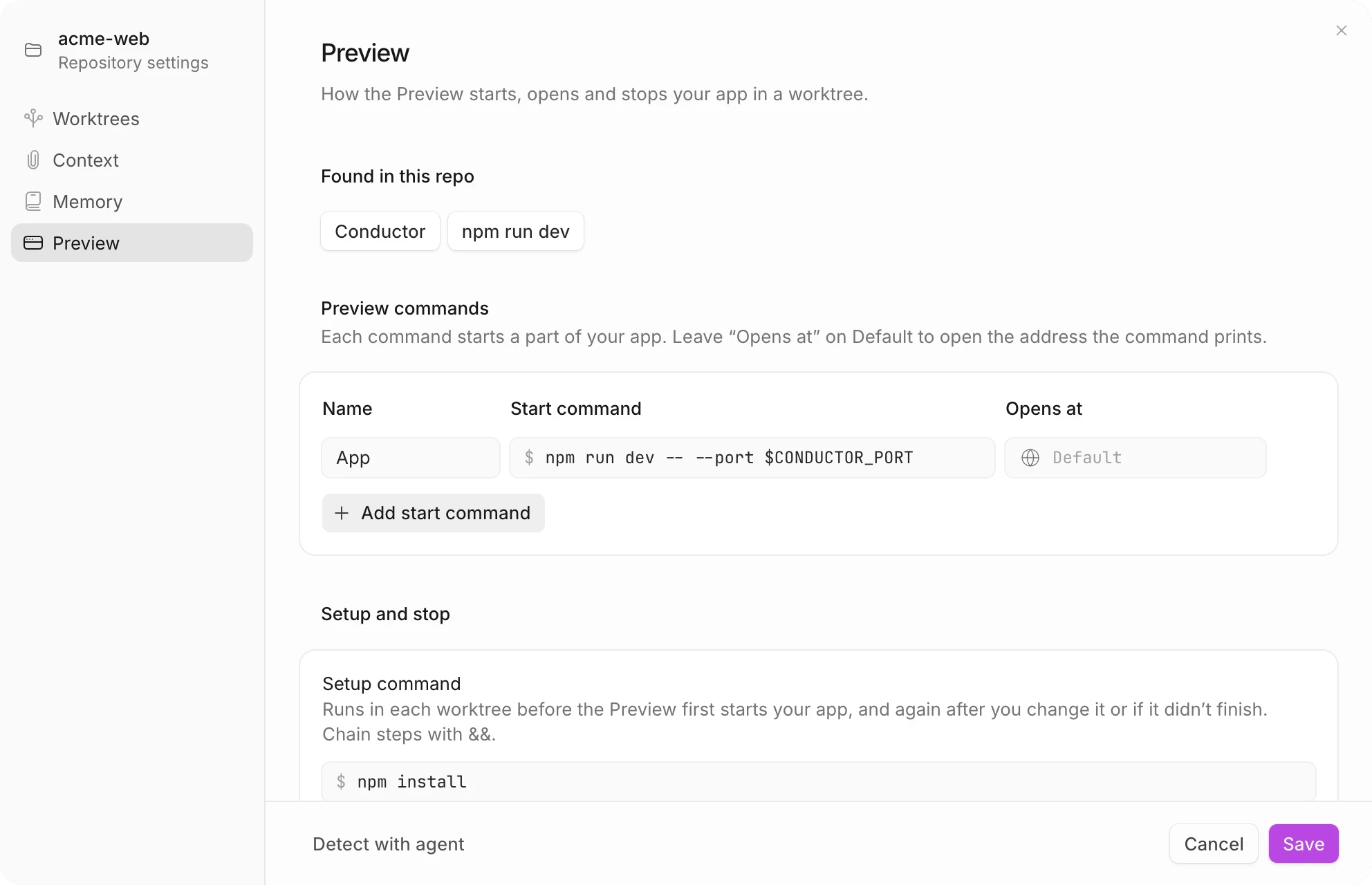
Close Repository settings, and click Start preview in the worktree. Wonder opens the Preview settings with Conductor’s run commands filled in. Check them, and click Save.
What’s different in Wonder
Conductor’s names and shortcuts come from its docs, checked on November 6, 2026.When you’ve finished moving
Keep~/conductor until its chats are continued and you’re happy with the copies. Your Claude Code memory stays in Wonder after you delete it, if you’ve opened Wonder 0.2.233 or later once while ~/conductor was still there. You don’t need to start a chat.
Deleted ~/conductor before that? Its memory is still on your computer. In the repository’s ⋯ menu, open Repository settings → Memory, and click Use this folder next to the folder marked From Conductor.
Don’t move a Conductor workspace into Wonder’s own worktree folder: Remove repository deletes what’s there.
On Windows? Conductor’s desktop app is Mac-only, so there’s nothing to move from it.
If something goes wrong
- The agent says it doesn’t have the tool: update Wonder to 0.2.220 or later, and ask again.
- The agent doesn’t start the move: send “Move my work from Conductor to Wonder.” exactly, in a chat where you haven’t asked for anything else.
- A chat isn’t in
/resume: see If a chat is missing. It may also be older than 30 days, already continued, or from another agent.